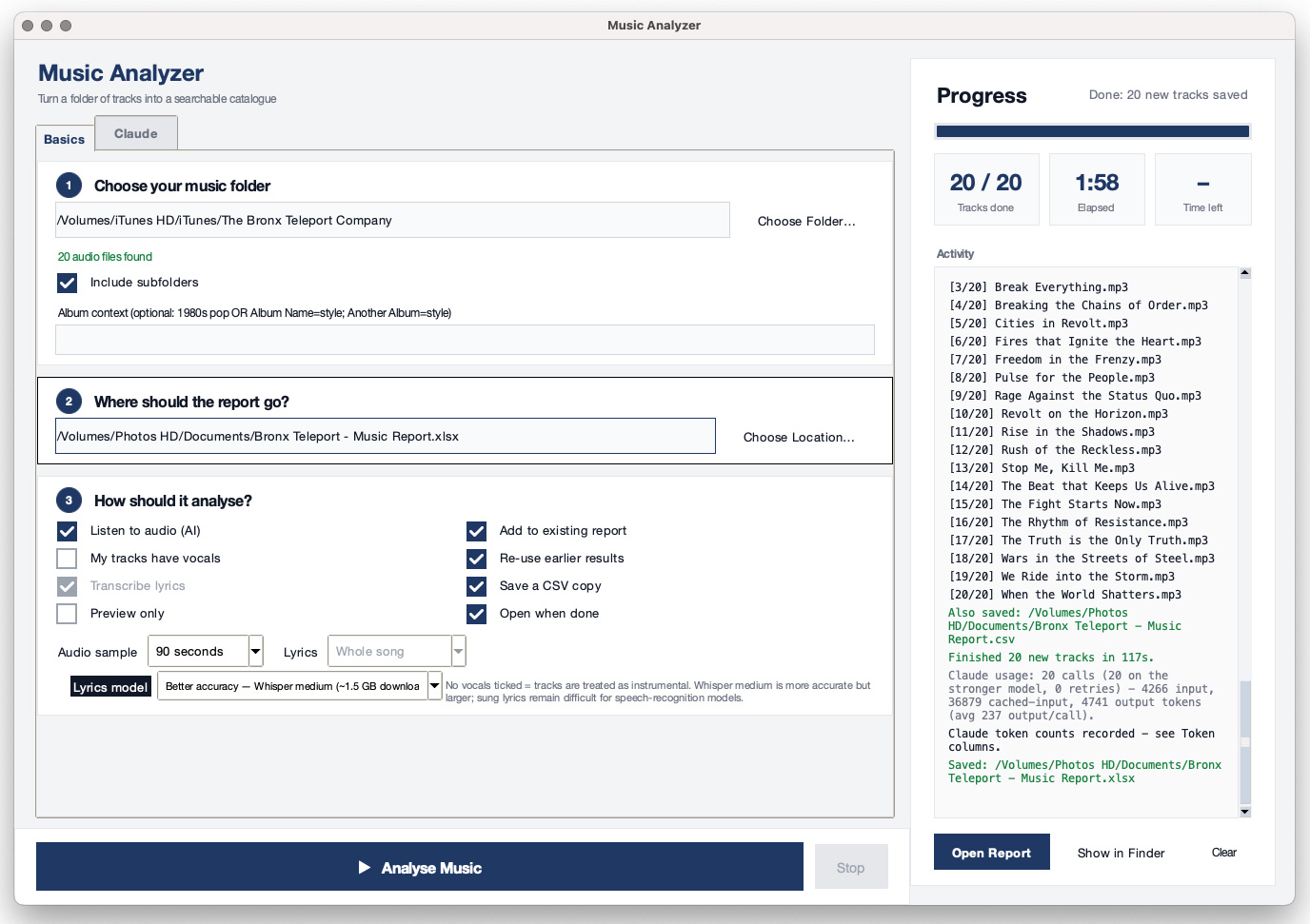
A composer's library, finally searchable
When you have thousands of tracks, "I know I wrote something moody with cello and a slow pulse" is not a search query. File names and folders only go so far, and pro cataloguing tools are expensive.
Point Lionel's Music Analyzer at a folder. It analyzes each track on your own computer and writes everything to one Excel file you can sort, filter and search in seconds. Pitch a brief, answer a music supervisor, or just rediscover your own work.
What it figures out for each track
Instruments and vocals
Local AI listens for the instruments in the mix and whether there are vocals, so you can filter for "solo piano" or "instrumental only."
Tempo and key
BPM, tempo feel and musical key, with an alternate tempo shown when half-time or double-time is likely.
Genre, style and era
Genre from your tags and from the audio itself, plus sub-genre and an era or decade feel.
Moods
Describe the emotion of each track, then search by feeling instead of by file name.
Descriptions and keywords
Optional: have Claude write a description, keywords, suggested uses and a one-line Vibe Check you can set from serious to funny.
Your existing tags
Reads title, artist, album, year, composer, format and bitrate from your files, with a Metadata Review column to flag gaps.
Then find the right cue in seconds
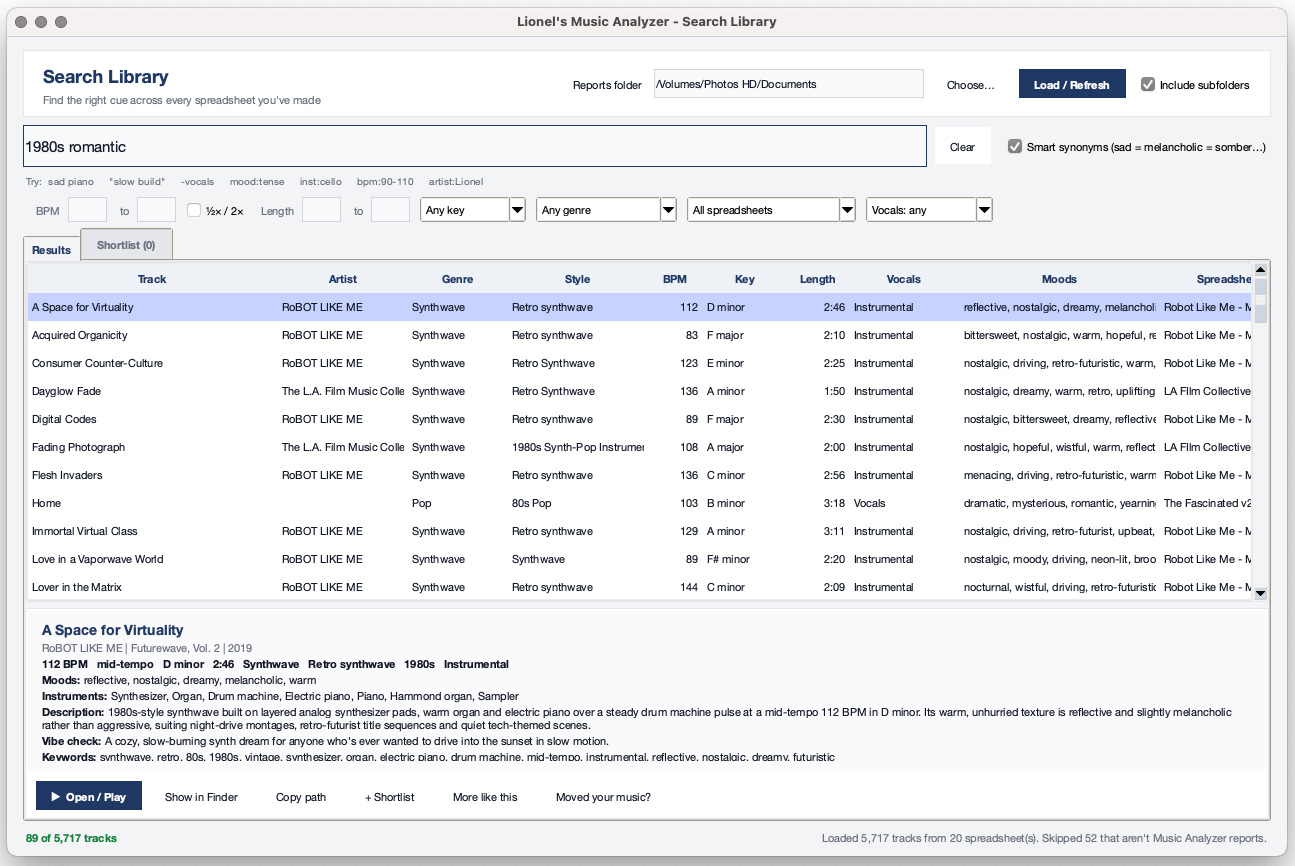
A catalog is only useful if you can search it. The Search Library window reads every spreadsheet in a folder and searches all of your tracks at once. A music supervisor asks for "tense, minimal, under two minutes"? You have an answer before they finish the email.
Search the way you think
Type sad piano or warm acoustic guitar. Smart synonyms mean "sad" also finds melancholic, somber and wistful. Use quotes for exact phrases, -vocals to exclude, and mood:tense or inst:cello to search one column.
Filter by the numbers
Narrow by BPM range, length, key, genre, instrumental or vocal, and which spreadsheet it came from. Half-time and double-time matches are included on request, so a 72 BPM track shows up when you need 144.
More like this
Found a track that's almost right? One click ranks the rest of your library by shared moods, instruments, keywords, genre, tempo and key.
Build a pitch shortlist
Collect your picks, put them in order, and export to Excel, copy a text list for an email, or copy the audio files into a numbered folder ready to send.
Play it right there
Double-click a track to hear it in your music player, or show it in Finder. If you move your music to a new drive, tell the app once and it finds everything again.
Fast on big libraries
Your catalogs are cached, so reopening is quick even with thousands of tracks across many spreadsheets. If a track appears in two reports, the newest one is used.
Built for real libraries
Tracks arrive all year, so the app is designed to grow with you.
- Keep existing report: add new tracks to your catalog without losing the notes and edits you have already made.
- Fast by design: analyze 90 seconds of each track by default, or choose the whole track.
- One tidy spreadsheet: about 36 columns, including file path, format, bitrate, loudness and analysis status.
- Search built in: the Search Library window finds cues across every catalog you have made.
- Self-checking: a Doctor button confirms everything needed is installed.
- Private: analysis runs locally. If you use Claude descriptions, only text data is sent, never audio.
Easy to start
- Install on your Mac. Unzip, then double-click the installer. It sets up what it needs and puts the app on your Desktop.
- Pick your music folder and where to save the Excel report.
- Click Analyse Music. Come back to a finished catalog.
- Open the report in Excel, or press Search My Library to search all your catalogs at once.
Requires macOS and Python 3.12 (the installer opens the download page if you need it). Installation takes a few minutes, and the first run downloads a one-time 350 MB AI model.
Get Lionel's Music Analyzer
Pay what you like, from $9. Most people choose $19. Your donation supports continued development of the app.
Donate and download
You'll be taken to PayPal. After you finish, you'll return here and the download button will appear. For personal use only; see the license below.
Download free with a code
Have a code? Enter it to unlock the download at no charge.
Questions
Does it work on Windows?
Yes. The same download works on Mac and PC. On Mac double-click Install.command (right-click > Open the first time), on Windows double-click Install-Windows.bat. Both create an isolated environment so it works even with different Python setups. If the installer is blocked, run python3 music_analyzer_app.py directly.
Do I need an Anthropic (Claude) account?
No. Instrument, vocal and genre detection run locally. Claude is an optional extra for written descriptions, keywords and suggested uses. If you turn it on, you use your own API key from console.anthropic.com and pay Anthropic directly, roughly $0.01 to $0.03 per track. The key is stored in your macOS Keychain.
Is my music uploaded anywhere?
No audio is uploaded. Analysis happens on your computer. With Claude descriptions enabled, only text data about each track is sent.
Can I search across several spreadsheets at once?
Yes. Search Library reads every report in a folder (including subfolders) and searches all of them together. You can filter by spreadsheet, build a shortlist for a pitch, and export it to Excel.
Can I re-run it when I add new music?
Yes. Leave "Keep existing report" checked and new tracks are merged into your existing spreadsheet.
Which audio files does it read?
It reads common music formats and shows each file's format and bitrate in the report. If a track fails, the Notes column tells you why so you can re-run it.
Can I use it for my business or share it?
The app is licensed for personal use only and may not be shared, resold or redistributed. See the license terms below.